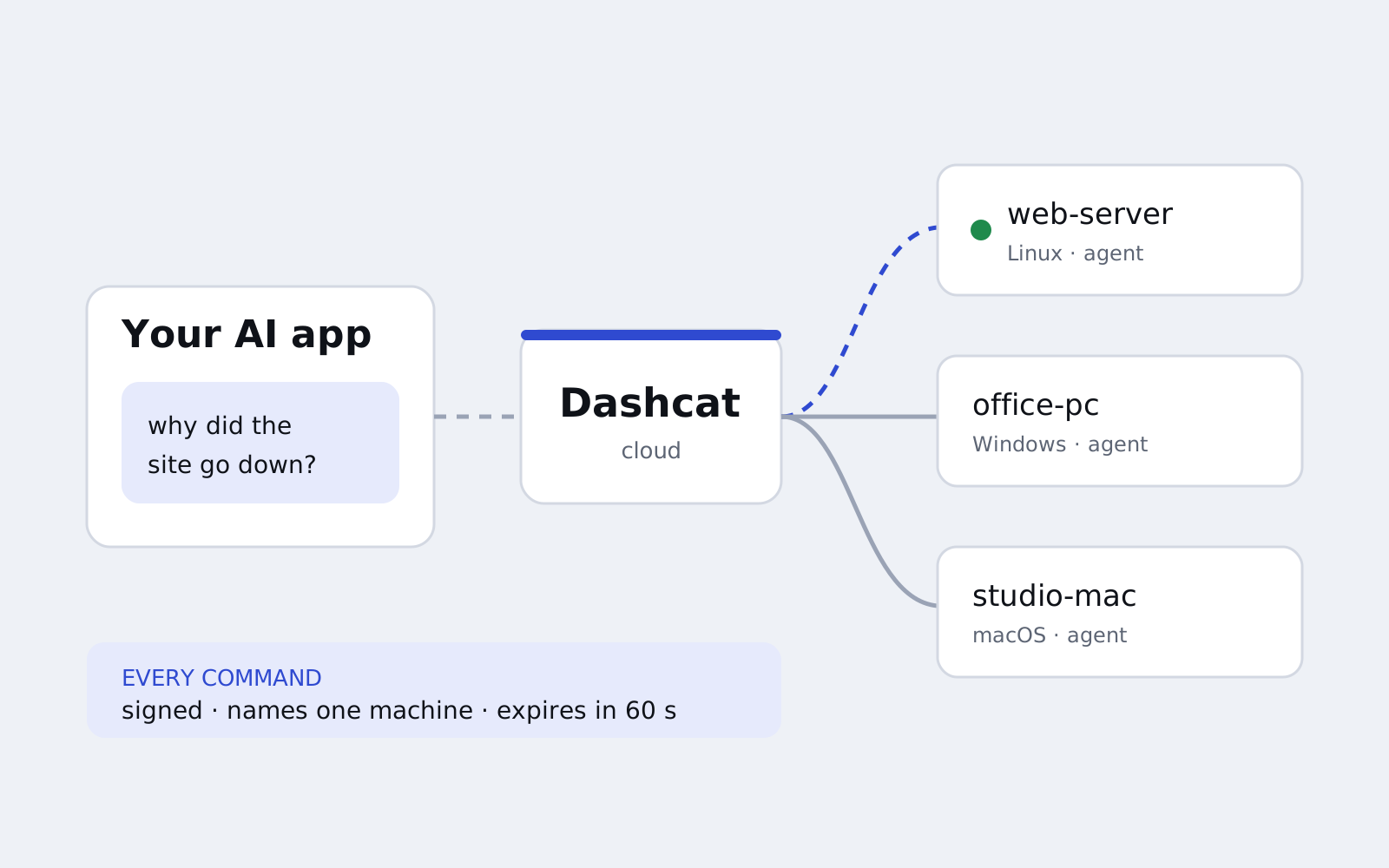
Dashcat lets people look after the Windows, Mac and Linux machines they are responsible for, from the AI apps they already use. You install a small agent on each machine, connect your AI app once, then ask in plain words: why did the website go down, is this laptop up to date, restart the print spooler on the office PCs.
I founded it and I am its only engineer. It is in invite-only production.
The problem
Letting software act on real machines is powerful, and it is exactly the kind of access that goes wrong quietly. A remote tool for this has to assume that requests can be replayed, that the text it reads back from a machine can be hostile, and that the person who owns the machine wants a say.
I first ran into this in 2019, with Soundboy, an app for controlling a PC’s volume from your phone. It trusted any device that said hello. That was fine for a volume control, but it is exactly the shortcut Dashcat could not take.
How it works
There are two ways to connect, for two kinds of customer.
- Hosted. Each machine runs Dashcat Agent, which holds one outbound connection to Dashcat’s cloud, so nothing listens on the machine and no ports are opened. An AI app adds the Dashcat connector, and the cloud turns each request into a signed command for one machine.
- Direct mode, for high-security setups. Dashcat Bridge runs next to the AI and talks to each machine itself, over mutual TLS 1.3 with keys pinned at pairing. Pairing uses a one-time code and a SPAKE2 exchange, so the code itself never crosses the network and cannot be guessed offline. Dashcat’s cloud is not in the path, and a machine set up for Direct mode only never trusts a cloud key, so the cloud cannot reach it even if it wanted to.
A desktop app brings the dashboard, the agent and the bridge together for people who would rather not touch a command line.
The security model
Every part of Dashcat was designed around that problem, before features.
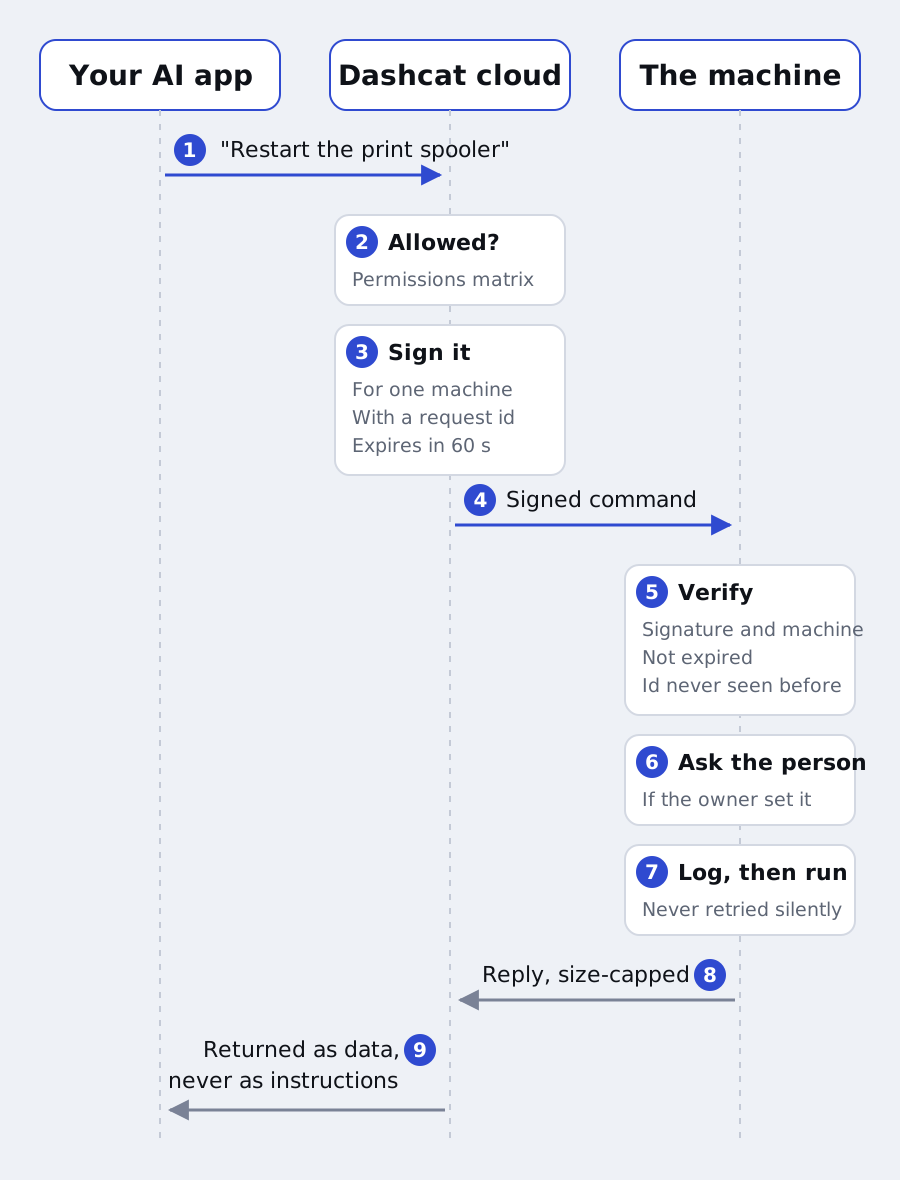
In practice that means:
- Signed, short-lived commands. Each command is signed for one specific machine, carries a request id and expires after 60 seconds, so it cannot be replayed or redirected. The machine checks all of that, and logs the request before running it.
- A permissions matrix. Owners choose what is allowed for each team, group and machine, and the cloud checks it before it signs anything.
- Approval at the machine. A machine can ask the person sitting at it before anything runs.
- Admin is opt-in. Commands that need administrator rights are off until the owner turns them on for that machine, and run through a separate service that checks every signature against its own store.
- Signed updates. The agent only installs updates signed by Dashcat.
- Output is untrusted. Everything that comes back from a machine (logs, files, screen text) is treated as data, never as instructions, and never drives what the cloud does.
- No silent retries. If a connection drops mid-command, Dashcat reports it rather than resending, because the command may already have run.
Each of these defences has a test that fails when the defence is removed, and I check that by breaking the defence before a change goes in.
Small on purpose
The agent runs on every machine, all the time, so it has a budget: one thread, no polling, and 10 MB of memory at most. Idle, it uses about 5 MB. Every reply is capped in size too, because it lands in an AI’s context window.
How it is built
The agent, bridge and shared libraries are Rust. The cloud service, dashboard, operator console and website are TypeScript on Cloudflare, with Durable Objects holding each machine’s connection. As of November 2026 it is about 44,000 lines of Rust with over 500 tests, and a similar amount of TypeScript.
Every significant design decision is written down as an architecture decision record before it is built: more than 60 of them so far, from the wire protocol to billing, account deletion and key rotation. When a decision changes, the record says so and why.
A decision, written down
Here is one record, lightly trimmed. Teams wanted to give the AI standing instructions, like “deploy version 848 to the tills”. That is useful, and it is also a new way to steer the AI, so the record has to say who can do it and what it can never do.
ADR 0038 · Instructions for the AI on the team, its groups and its nodes
Status: accepted
Context. People want to write short requests and have the AI know where builds live, what a version number points to and how to install one. Node notes and group descriptions describe machines; they are shown to the AI as data and are too short to hold how a team works.
Decision.
- Three levels. A team, each group and each node have instructions: plain text, up to 4,000 characters each.
- Order. A node's instructions are its team's, then each of its groups', then its own. The AI is told that later ones win where they disagree, and the user's own request wins over all of them.
- Who writes them. Owners and admins only, because the AI follows them. Every change is a team log line.
- What they are not. They guide the AI and never change what it may do: reach, signatures, limits and node checks are unchanged. Nodes never see them.
Alternatives considered. Putting instructions in every machine listing would fill the AI's context on every call. Letting any member write them was rejected: instructions steer the AI, so writing them is an admin's job.
Consequences. Someone who can edit instructions can steer the team's AI. The admin role now carries that, and the security page says so.